An open-source editor and a commercial editor with a free tier are different bets. A vendor can tighten export limits or discontinue a free plan. An open-source license keeps the code available, even if the original project slows down or changes hands.
That permanence comes with rough edges. Documentation, interface quality, captions, and social templates often lag behind commercial editors. The useful choice is which compromise fits the work you need to finish, rather than choosing by license alone.
Your platform and timeline needs narrow the list
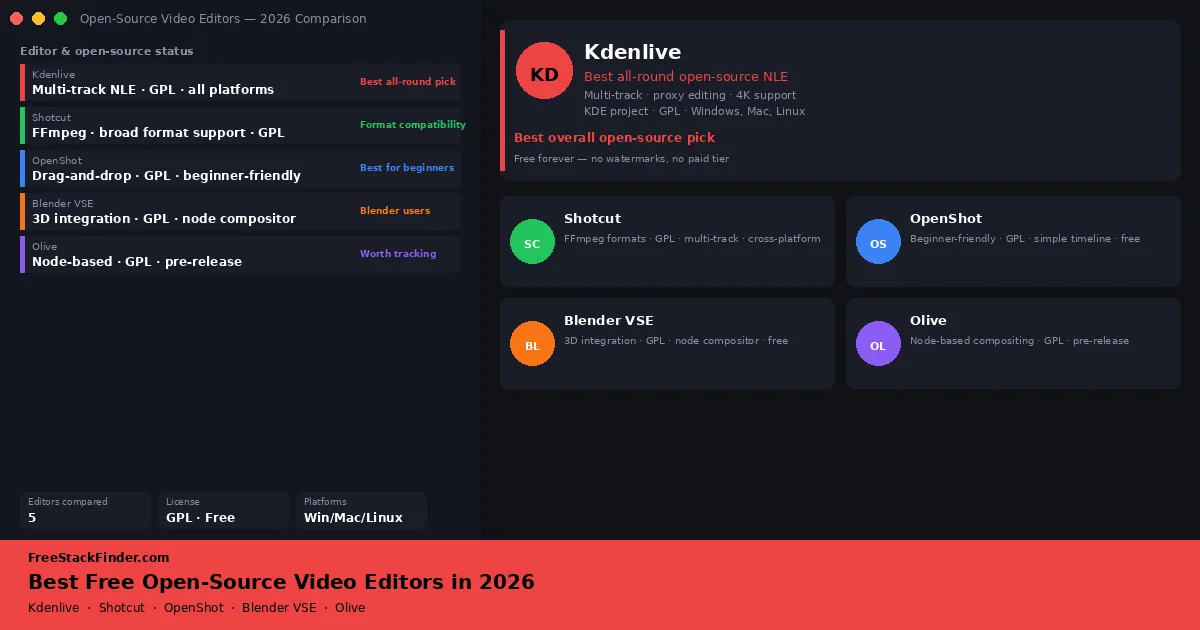
Start with Kdenlive for a conventional multi-track editor with proxy support. Keep Shotcut in mind for difficult source formats, and use OpenShot when the project is simple and the learning curve matters most. Blender’s Video Sequence Editor only makes sense if Blender is already part of the job. Treat Olive Video Editor as pre-release software, not the place to keep a deadline-critical project.
If color work matters more than license type, read our main free video editing software guide. DaVinci Resolve is proprietary, but its free tier has much deeper grading tools.
What open-source means here
All five tools in this guide publish their source code under open-source licenses, primarily the GPL. For the standard project builds compared here:
- Exports do not add a project watermark.
- The editing code is available without a separate proprietary Pro edition of the same application.
- Another maintainer can continue the code if the original project stops, although the license does not guarantee that this will happen.
- The license permits code inspection and modification, subject to its terms.
These licensing traits remove a subscription boundary, but support, documentation, release frequency, and platform behavior still vary by project. Check the current release on the operating system and footage used for the work.
Compare platforms and editing depth
| Editor | Best for | Platform | Complexity | Active development |
|---|---|---|---|---|
| Kdenlive | All-round NLE editing | Linux, Windows, Mac | Intermediate | Yes (KDE project) |
| Shotcut | Format and codec compatibility | Linux, Windows, Mac | Intermediate | Yes |
| OpenShot | True beginners | Linux, Windows, Mac | Beginner | Yes |
| Blender VSE | Blender users, motion graphics integration | Linux, Windows, Mac | Advanced | Yes (part of Blender) |
| Olive Video Editor | Node-based compositing, beta testing | Linux, Windows | Intermediate to Advanced | Active but pre-release |
The editors
1. Kdenlive: best overall open-source NLE
Kdenlive is the KDE project’s video editor and has been in development since the early 2000s. It uses the MLT multimedia framework for processing and supports proxy clips, which is useful when full-resolution footage is too heavy for the editing machine.
What the free version includes:
The entire tool: there is no paid tier. You get a proper multi-track timeline, proxy clip support for smoother 4K editing on mid-range hardware, a reasonable color correction toolset with scopes, audio mixing, keyframe animation, basic title creation, and a good range of built-in effects. The export dialog supports custom encoding profiles through FFmpeg.
Where Kdenlive has limits:
The Mac build works but feels less native than a Mac-first editor. The interface will also look dated to people coming from Final Cut Pro or Premiere. Auto-captions, template libraries, and social publishing integrations are absent. Its color tools cover basic correction, not the grading work Resolve is built to handle.
Who Kdenlive is best for:
Linux users who want a professional-feeling NLE without any commercial software. Windows editors who want the deepest open-source option with active maintenance. Anyone who wants a traditional cut-based workflow with proxy editing and doesn’t need captions or social templates. Organizations and schools that need free software they can audit.
Who should consider something else:
If you are new to editing, Kdenlive has a steeper learning curve than OpenShot or CapCut. DaVinci Resolve is the better fit for serious color work. Mac users who care about native integration should start with a Mac-focused editor instead.
2. Shotcut: best for format and codec compatibility
Shotcut is a free open-source editor built around the same MLT framework as Kdenlive. Its reason for being on this list is format flexibility: older camcorder files and mixed-source footage often need less preparation before import.
What the free version includes:
The full editor: no paid tier. Multi-track timeline editing, a broad effects library, audio mixing, and export support across dozens of formats. The filter-based editing model means effects and transitions are applied as non-destructive filters directly on clips.
Where Shotcut has limits:
The timeline model takes adjustment if you are coming from Kdenlive or Premiere. Projects with many clips and tracks can be harder to manage than they are in Kdenlive. Color tools are limited, and auto-captions, motion tracking, and complex compositing are not included.
Who Shotcut is best for:
Editors dealing with unusual or difficult-to-import footage: old camcorder formats, mixed-source projects, footage from uncommon devices. People who need cross-platform reliability and want all common codec questions answered in one download. Shotcut is worth keeping installed even if you use a different primary editor because it can handle stubborn imports.
Who should consider something else:
If your footage is standard HD or 4K from modern cameras, Kdenlive or OpenShot will be more intuitive. Shotcut’s edge is specifically in format handling: if that is not your problem, you are giving up ease of use without a corresponding benefit.
3. OpenShot: best for beginners
OpenShot has existed since 2008 and remains the simplest fully open-source editor available. Its clean three-panel layout and drag-and-drop clip management provide enough features for basic finished videos without giving a first-time editor too many controls.
What the free version includes:
The full editor. Drag-and-drop timeline editing, basic transitions and effects, a title editor with 3D title animations (generated via an optional Blender integration), audio waveform visualization, cross-platform support, and basic export options.
Where OpenShot has limits:
Heavy projects with many clips, long timelines, or 4K footage can expose OpenShot’s limited proxy, color, and audio workflows. Test representative media before choosing it for that kind of project.
Who OpenShot is best for:
First-time editors who want a simple place to learn. Teachers or students who need a free tool with a license that allows broad reuse. Anyone making short personal videos, class projects, or basic slideshows who does not need professional features.
Who should consider something else:
Once you want multi-camera editing, proper color tools, proxy workflows for 4K, or anything approaching a professional output, OpenShot is the wrong tool. Move to Kdenlive when the project demands more than OpenShot provides.
4. Blender Video Sequence Editor: best for Blender users
Blender is primarily a 3D creation suite, modeling, rigging, animation, rendering, compositing, and its Video Sequence Editor (VSE) is its built-in video editing module. The VSE is not a standalone editor competing with Kdenlive; it is a tool for Blender users who need to cut together footage, add motion graphics from Blender’s scene system, and export a finished video without leaving the application.
What the free version includes:
Blender is completely free and open-source (GPL). The VSE includes multi-track clip arrangement, basic transitions, audio mixing, and access to Blender’s compositor and 3D render engine for overlays and effects. Those connections are the point; a non-Blender user gets little benefit from accepting the extra complexity.
Where the VSE has limits:
The VSE is not a sensible primary editor for most workflows. Splitting a clip, adding a J-cut, or trimming across many tracks takes more steps than it does in a dedicated editor. Auto-captions, template libraries, and social publishing tools are missing, and long timelines can be slow without dedicated GPU support.
Who Blender VSE is best for:
3D animators and motion graphics artists who already know Blender and need to assemble a final video without leaving the application. Creators who want to combine rendered 3D elements, composited effects, and recorded footage in a single workflow. VFX-adjacent work where Blender’s compositor is part of the pipeline.
Who should skip the VSE:
Anyone who does not already use Blender. The learning curve to get basic cuts done is higher than Kdenlive or OpenShot for a non-Blender user, and the tradeoff only makes sense if you are also using Blender’s other tools.
5. Olive Video Editor: worth tracking, not yet production-ready
Olive is an open-source node-based video editor that has been in development since 2018. It aims to offer a modern NLE interface combined with a node compositor: similar in concept to DaVinci Resolve’s Fusion, but fully open-source. The design and approach are promising, and the project has attracted genuine interest from the open-source video community.
Current status:
Olive has been a pre-release project for a long time, and its release status can change between article refreshes. Check the current project page before installing it. Unless the project has clearly reached a stable release by the time you read this, treat it as a promising tool to evaluate rather than a production editor. Files created in earlier versions have had compatibility issues with later builds. The project has a small team, and development pace varies.
Who it is worth installing:
Technically curious editors who want to evaluate open-source compositing tools. Developers who want to contribute to or influence the direction of an emerging tool. Anyone who wants to follow a project that could become a useful open-source compositor in the next few years.
Who should not rely on it yet:
Anyone working on projects where data integrity and delivery deadlines matter. Olive is not yet reliable enough for work you cannot risk losing or rebuilding.
Olive Video Editor project page ->
Who should skip open-source editors entirely
Open-source editors are a good fit for a specific kind of user. They are not the right starting point for everyone.
If you need serious color grading. DaVinci Resolve’s free tier is proprietary, but its scopes and node-based grading go well beyond the tools listed here. If color work is central to the output, license type should not drive the choice.
If you create primarily short-form social content. CapCut is not open-source, but it combines auto-captions, templates, social-format presets, and platform-specific sizing in one workflow. The open-source editors here require more manual setup for those jobs. See our free Premiere Pro alternatives guide for a comparison that includes both open-source and proprietary options.
If you want a Mac-native editor. iMovie is a free App Store download for supported Macs and handles casual editing. DaVinci Resolve has an Apple Silicon build. Kdenlive works on Mac but follows a cross-platform interface. See the free video editing software for Mac guide for the platform-specific tradeoffs.
If you need auto-captions or motion tracking. These features are not well-represented in the open-source editing space. CapCut and DaVinci Resolve are the practical options here.
Common mistakes when choosing an open-source editor
Picking Kdenlive without checking the platform. Kdenlive publishes separate builds for Linux, Windows, and macOS, and platform-specific behavior can differ. Check the current requirements and test representative footage before moving a project.
Assuming open-source means outdated. Kdenlive and Blender both release regularly and have large contributor bases. OpenShot and Shotcut are actively maintained. The “open-source = abandonware” assumption does not apply here.
Using OpenShot for heavy projects. OpenShot is designed for a simpler editing workflow. Editors who need proxy workflows, advanced color tools, or long 4K timelines should test Kdenlive or another deeper editor with representative footage before moving the project.
Treating Blender VSE as a general NLE recommendation. Blender’s video editor is excellent within Blender workflows. It is not a general-purpose editor recommendation for people who do not already use Blender.
Waiting for Olive to stabilize before learning another editor. Olive is worth following, but it is not yet at a point where it should be your primary tool. In the meantime, Kdenlive is the practical choice.
Pairing with other free tools
Most editing workflows need more than an editor. Open-source editors work well alongside free recording and capture tools. If you need to capture screen recordings, gameplay, or webcam footage before editing, see our guide to free screen recording software: OBS Studio is itself open-source and pairs naturally with Kdenlive.
Kdenlive for depth, OpenShot for simpler timelines
Choose Kdenlive for ongoing editing work. Choose Shotcut when import compatibility is the immediate problem, and OpenShot when a simple first project matters more than room to grow. Use Blender VSE only when the project already depends on Blender. Olive is still one to watch rather than one to trust with the only copy of a project.
For a comparison that also includes proprietary tools with free tiers, see our free video editing software guide covering DaVinci Resolve and CapCut.