Message history is the first constraint
Slack Free exposes only the most recent 90 days of messages and files. Content older than one year is deleted from a free workspace, so teams that need a durable conversation archive must either pay, export what Slack permits, or move elsewhere.
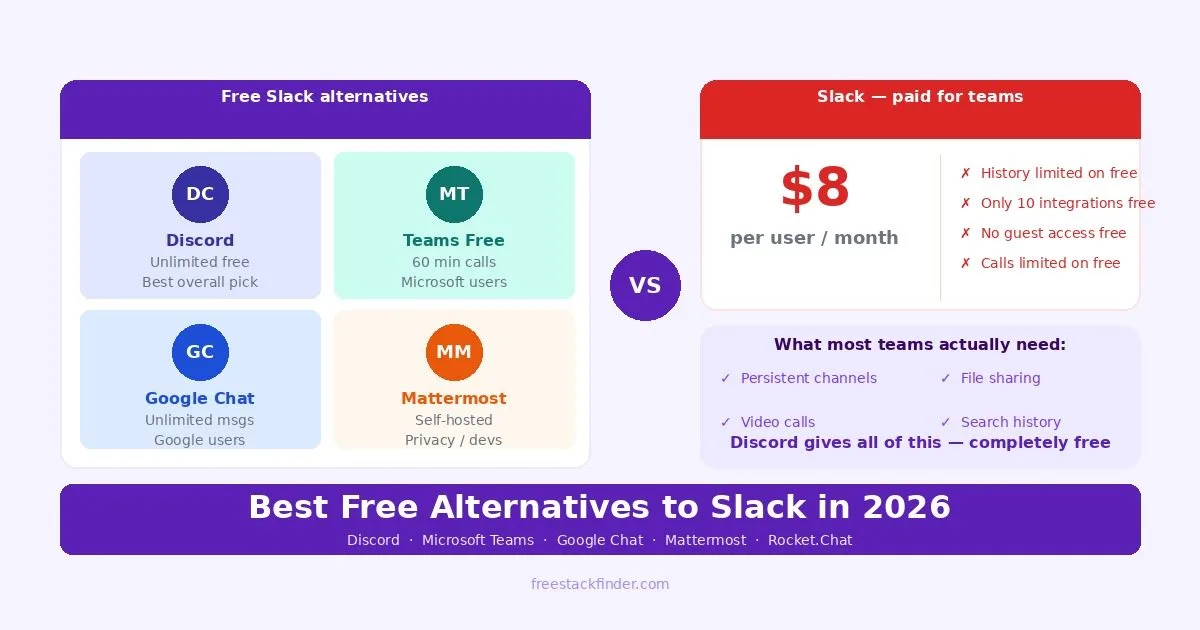
Discord fits informal teams that want persistent channels and voice rooms without Slack’s 90-day visibility window. Microsoft Teams Free and Google Chat make more sense when files and accounts already live in those ecosystems. Choose Mattermost or Rocket.Chat only when someone can operate a self-hosted service. Slack’s paid plans remain relevant for established app workflows, Slack Connect relationships, and managed compliance features.
The five alternatives below differ most in account model, administration, file sharing, and hosting responsibility. Check those constraints before moving an archive or inviting clients.
Slack’s 90-day window changes the archive
On Slack’s current free plan, conversations and files older than 90 days are hidden from view. Data older than one year is deleted, so upgrading later will not recover the oldest material.
Slack Free also permits up to ten third-party or custom app installations. Count the workspace’s existing connections before treating that cap as the reason to migrate.
Slack Pro charges per active user, so the total changes with team size and billing terms. Compare the current price with the cost of migration, retraining, archive handling, and any server maintenance required by a self-hosted alternative.
Five alternatives to Slack’s free plan
1. Discord: best for informal teams and communities
Discord is a voice, video, and text platform built around communities and private groups rather than managed workplace tenants.
Discord does not impose Slack’s 90-day visibility window on ordinary server messages. It includes channels, threads, forum channels, bots, file sharing, screen sharing, voice rooms, and desktop and mobile clients.
The tradeoffs concern administration and workplace fit. Some upload, streaming, and customization features require Nitro, while enterprise identity, compliance, and retention controls are not Discord’s focus. Discord calls its spaces servers rather than workspaces and uses a community-oriented permission model.
A natural fit for creator groups, open-source projects, clubs, and small teams whose work does not require managed retention or enterprise compliance controls.
For a private work group, disable public discovery, assign administrative roles carefully, and create only the channels the team will use. Store large or business-critical files in a managed file service and link them from Discord so access and retention do not depend on chat attachments.
For teams also looking for dedicated meeting tools for more formal client calls, see our free Zoom alternatives guide.
2. Microsoft Teams free: best for teams using Microsoft apps
Microsoft Teams free is Microsoft’s workplace communication and collaboration platform with a free tier covering core messaging and meeting features.
Compared with Slack Free, Teams Free trades third-party integration breadth for Microsoft account and file integration. It includes chat, group meetings, screen sharing, file sharing, and desktop and mobile clients. Confirm the current participant and meeting-duration caps on the Teams Free page before scheduling a workshop or large event.
The constraints to plan around include group-call duration, participant limits, recording access, storage, and administrative controls. The free product is also different from the managed Teams experience included with some business subscriptions.
Teams free is the most natural Slack replacement for organizations that already rely on Microsoft tools. Its persistent channels, OneDrive file sharing, and links to Office web apps keep chat and shared work in one place. If your team already stores files in OneDrive and keeps meetings short, Teams is efficient; if the chat tool needs to be lightweight and independent from Microsoft accounts, Discord or Google Chat will feel easier.
3. Google Chat: best for teams already using Google Workspace
Google Chat is Google’s team messaging platform, integrated with Gmail, Google Drive, Google Meet, and the rest of the Workspace suite.
Google Chat is embedded in Gmail and is also available through its own web and mobile apps. Personal Google Accounts can create collaboration spaces, while paid Workspace accounts add organization-managed features. Message retention depends on whether history is enabled and, for work or school accounts, the administrator’s policy; Google’s history documentation explains the difference.
Compared with Slack, Chat has fewer third-party workflow integrations and different rules for external members. Check the account-type comparison before assuming a feature available to a Workspace organization also exists on a personal account.
The natural choice for teams already using Gmail and Google Workspace, where Chat feels like an extension of existing workflows rather than a new tool to adopt. If your team lives in Gmail, Google Drive, and Google Docs, Chat is already embedded in those interfaces. You can start a conversation from a shared Google Doc, jump to a Meet call, and store files in Drive without opening a separate app. For teams that do not need deep third-party integrations, that convenience outweighs what Chat lacks compared to Slack.
4. Mattermost Team Edition: self-hosted chat for small groups
Mattermost Team Edition is an open-source, self-hosted messaging platform. It is intended for small teams, hobbyists, or personal use rather than a managed cloud replacement for Slack.
Team Edition provides channels, direct messages, threads, file sharing, and clients for major desktop and mobile platforms. The current edition documentation describes it as a free self-hosted option for fewer than 250 activated users when single sign-on is not required.
The organization supplies the server, database, storage, updates, monitoring, and backups. Single sign-on, advanced access controls, compliance features, and vendor support belong to other Mattermost offerings. Mattermost Entry is a separate limited-use evaluation tier and should not be treated as an unrestricted production plan.
Choose Team Edition when a small group wants local control and has someone responsible for the deployment. Hosting it yourself keeps the message store on infrastructure you select, but it also makes availability and recovery your responsibility.
5. Rocket.Chat Starter or Community: limited self-hosted options
Rocket.Chat offers two free self-hosted entry points with different limits: Starter and Community.
The current plan documentation limits Starter to 50 users and describes Community as core messaging for up to 100 concurrent users. Community supports video calls through Jitsi or BigBlueButton and has limited app integrations. Rocket.Chat says Community is intended for hobbyist, educational, or small non-production deployments.
Both options require server setup and ongoing maintenance. Starter exposes more premium capabilities within usage limits; Community provides a narrower open-source feature set. Neither should be presented as a free managed cloud workspace.
Choose Rocket.Chat only after matching the user count and feature needs to one of those free editions. A production team that needs support, compliance controls, high availability, or broader integrations should price a commercial plan instead of assuming Community will cover the workload.
Hosting and history comparison
| Tool | Message history | Integrations | Video calls | Best for |
|---|---|---|---|---|
| Discord | No 90-day visibility window | Bots and webhooks | Voice and video rooms | Informal groups |
| Microsoft Teams | Retained in the account | Microsoft-centered | Group calls with plan limits | Microsoft users |
| Google Chat | Controlled by history settings | Google-centered | Via Google Meet | Google users |
| Mattermost Team Edition | Controlled by the host | Basic integrations | Calls depend on edition and setup | Small self-hosted groups |
| Rocket.Chat Starter / Community | Controlled by the host | Plan-dependent | Supported providers vary by edition | Limited self-hosted deployments |
| Slack free | ⚠️ 90 days only | ⚠️ 10 max | ⚠️ Limited | Existing Slack users only |
Common mistakes when switching from Slack
Migrating channels but not habits. Decide which channels own which topics, what response times are expected, and where the old Slack archive remains available. Copying every channel without those decisions carries the same clutter into the new service.
Choosing self-hosted without accounting for maintenance. Mattermost and Rocket.Chat require compute, storage, updates, backups, monitoring, and an owner for outages. Include that work in the comparison with a hosted subscription.
Switching during a high-pressure period. A new communication tool creates migration work: channels need owners, notifications need adjustment, and some people will fall back to email. Schedule the move outside a product launch or client deadline, and keep the old archive available until the team can find prior decisions in the new system.
When Slack’s paid history is worth it
Slack Pro and Business+ make sense when the workspace depends on integrations or custom workflows that would need to be rebuilt elsewhere. Inventory those connections and their owners before choosing a replacement.
Enterprise compliance requirements are the other strong argument for Slack paid. Data retention policies, eDiscovery, audit logs, and SSO integrations are available on Slack’s Business+ and Enterprise Grid plans at a level that free tools cannot always match with the same reliability and support guarantees.
For organizations where Slack is deeply embedded in customer support workflows, using Slack Connect to communicate with external clients and vendors, the network effect of staying on Slack makes sense. Asking external contacts to switch to Discord or Mattermost adds work that may cost more in relationship management than the subscription saves.
Keep Slack only when its integrations justify the limit
Choose Discord for an informal group that does not need managed workplace controls. Google Chat and Microsoft Teams Free fit teams already using those companies’ accounts and files. Choose a self-hosted option only when someone owns its operation and recovery. Keep Slack when its integrations, external relationships, or paid administrative controls cost less than moving. For scheduling and shared documents, pair the chat tool with a free calendar app and a free Microsoft Office alternative.