Your storage job determines the alternative
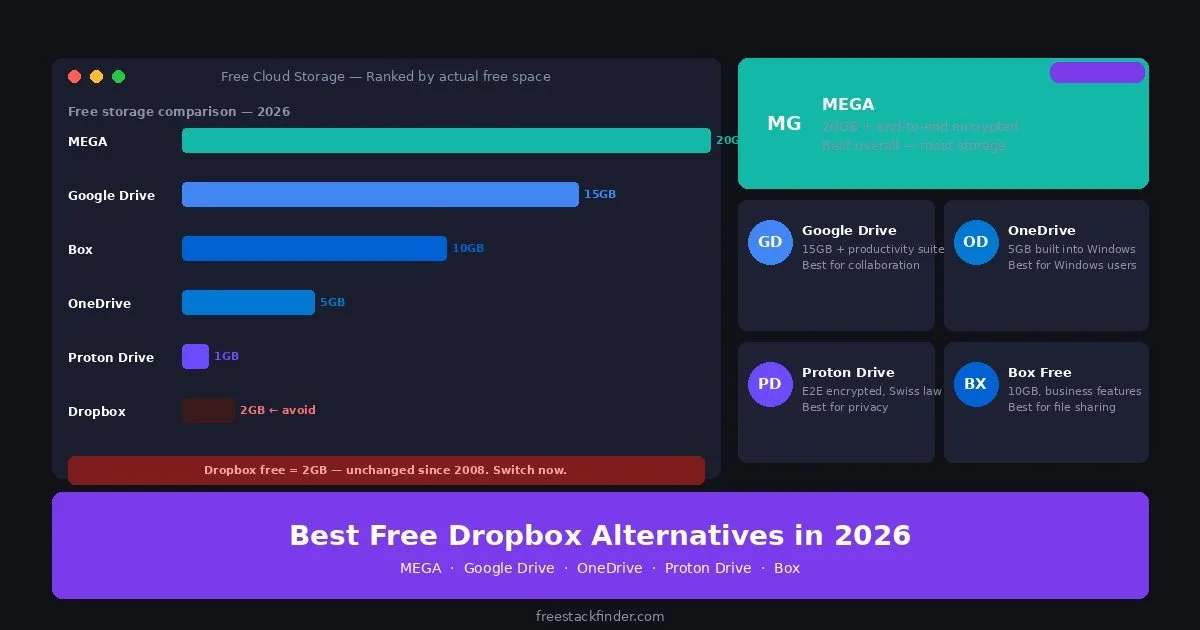
Dropbox Basic includes 2GB of storage. MEGA lists 20GB and client-side encryption, while a Google Account includes 15GB shared across Drive, Gmail, and Photos. OneDrive includes 5GB and integrates with Windows, and Proton Drive lists up to 5GB with end-to-end encryption. The official plan links beside each product below support those current limits. For a broader comparison, see our free cloud storage guide.
Before picking by storage size alone, separate three different jobs: sync keeps a folder identical across devices; storage parks files in the cloud; backup keeps multiple historical copies you can restore from after a mistake or ransomware event. Every tool below handles sync and storage well: none of them are real backup tools. If you delete a file locally and it syncs, the cloud copy is gone too. Keep that distinction in mind as you read the tradeoffs.
A 2 GB sync folder fills quickly
Dropbox’s desktop client keeps a familiar sync folder across devices, but the Basic plan’s 2GB allowance leaves little room for photos or active media projects. Referral bonuses may expand an individual account, but they are not part of the base allowance and should not drive a comparison.
Dropbox still handles desktop sync, shareable links, and version history well. The problem is the 2GB free allowance. A phone backup or one active media project can consume it, so the alternatives below trade Dropbox’s familiar client for more space, stronger privacy, or closer ties to an office suite.
Five alternatives to Dropbox Basic
1. MEGA: best for maximum free storage and privacy
MEGA is a New Zealand cloud storage service. Its plan comparison lists 20GB on the free plan, and its security overview describes client-side, user-controlled encryption. Desktop clients are available for Windows, macOS, and Linux, with mobile and browser access as well.
Free accounts use a variable transfer quota, so MEGA is less predictable for public download links or repeated movement of large media files. It fits personal sync and encrypted storage better than a distribution workflow. Encryption also does not remove the need for a strong password and recovery-key backup; losing both can make the account unrecoverable.
2. Google Drive: best for productivity and collaboration
Google’s cloud storage and productivity suite is included with every Google Account. The 15GB allocation is shared across Drive, Gmail, and Google Photos.
Google Drive competes less on raw storage than on what comes with the account. The 15GB pool sits beside Docs, Sheets, Slides, Forms, desktop sync, mobile apps, and search across file contents. Pick it when shared documents matter more than encrypted storage. If you need help choosing Office tools that work alongside Drive, see our free Microsoft Office alternatives guide.
The tradeoffs sit on the privacy and accounting side. Drive does not provide personal end-to-end encryption for ordinary files, and the shared storage pool means an established inbox or photo library can leave much less than 15GB for Drive.
A natural pick for: anyone already using Gmail (the 15GB is shared anyway), users who want cloud storage alongside productivity tools, and teams that collaborate in documents more than they sync raw files.
Check the account’s storage dashboard before migrating. Gmail, Google Photos, and Drive all draw from the same 15GB pool, so the usable space depends on what is already stored there.
3. OneDrive: best for Windows users who want zero-setup sync
Microsoft’s cloud storage service is integrated with supported Windows versions. Its free plan currently lists 5GB.
OneDrive is included with many supported Windows installations and integrates with File Explorer, although it can be removed, disabled, or absent on a managed device. Signing in with a Microsoft account can activate the 5GB sync folder. You also get iOS and Android apps, web access through Microsoft 365 for the web, shareable links, and version history. The workflow is familiar to Dropbox users, but selective sync and organization differ.
OneDrive Free provides 5GB, compared with Google Drive’s 15GB and MEGA’s 20GB. Full desktop Office apps and advanced collaboration controls require a paid Microsoft 365 plan. OneDrive offers more room than Dropbox Basic, but a collection that is already growing past 2GB may soon outgrow 5GB as well.
The zero-setup advantage makes most sense for Windows-first users with a modest file footprint who value not adding another sync client to their machine.
4. Proton Drive: best for privacy-first cloud storage
Proton’s Drive plan comparison lists up to 5GB of end-to-end encrypted storage on a free account.
Compared with Dropbox, the main difference is the encryption model rather than capacity. Proton says file contents, filenames, and folder names are end-to-end encrypted. The same account can also access Proton Mail and Proton VPN, although each free product has its own limits.
The tradeoffs are practical. 5GB is smaller than MEGA, Google Drive, or Box, and Proton’s collaboration tools are narrower than Google Drive’s. Both Proton Drive and MEGA describe end-to-end or client-side encryption, so compare their recovery models, sharing behavior, apps, and legal jurisdictions rather than treating encryption as a unique Proton feature. For account security alongside your cloud storage, see our free password managers guide to protect your cloud access credentials.
Best treated as a privacy-first secondary store rather than a primary sync folder unless your file footprint fits inside 5GB.
5. Box Free: best for business document workflows
A business-focused cloud storage platform with a 10GB free personal plan and a 250MB upload limit.
Unlike Dropbox’s consumer-first design, Box sits between consumer and enterprise cloud storage. The 10GB free tier is generous for document-heavy workflows, and the integrations with Microsoft 365 and Google Workspace mean you can open and edit files in their native applications directly from Box. Web access, desktop sync, iOS and Android apps, link-based sharing, and limited e-signature integration are all included.
The hard constraint is the 250MB maximum file size per upload, which rules Box out for video files, raw photo archives, design files, or any large media library. Advanced workflows, automation, admin controls, and reporting all sit behind paid Business plans. If your storage is mostly documents and presentations rather than media, that file-size cap is rarely a problem in practice.
A natural fit for small businesses whose cloud storage use is primarily document-centric, contracts, reports, spreadsheets, and who value Box’s business-oriented sharing controls over consumer convenience.
Compare storage and privacy
| Service | Free storage | Desktop sync | E2E encryption | Best for |
|---|---|---|---|---|
| MEGA | 20GB | Yes | Yes | Larger encrypted storage |
| Google Drive | 15GB shared | Yes | No | Productivity and collaboration |
| OneDrive | 5GB | Built into Windows | No | Windows file sync |
| Box Free | 10GB | Yes | No | Business documents |
| Proton Drive | Up to 5GB | Yes | Yes | Privacy-first storage |
| Dropbox Basic | 2GB | Yes | No | Existing Dropbox workflows |
Common mistakes when choosing free cloud storage
Storage numbers do not tell the whole story
Transfer limits, sync behavior, collaboration, and where files land on a device can matter more than the headline capacity. MEGA’s variable transfer quota and Proton Drive’s smaller allowance suit different jobs.
Sync is not a backup by itself
If you delete or overwrite a file and that change syncs, the cloud copy changes too. Recovery windows vary by provider and plan, so check the current retention policy before relying on it. A dedicated backup tool keeps independent copies according to a defined schedule and retention policy. See our free backup software guide for that workflow.
Test the desktop client before migrating
Web interfaces can look similar while selective sync, conflict handling, and operating-system support differ. Test a representative folder and conflict before moving the only working copy.
When Dropbox’s paid plan makes sense
Dropbox’s paid tiers make sense for teams that already depend on its sync client, Paper, or online-only file access. That continuity can be worth paying for when a migration would disrupt shared folders. On the free tier, the 2GB cap remains the deciding weakness.
When paid cloud storage is worth it
Stay on a free tier while your files, sync requirements, and version-history window fit inside it. Paying starts to make sense when you split files between services to avoid a cap or lose an edit after the recovery window expires.
Free tiers are sufficient until you either run out of space consistently, need team admin controls, or want guaranteed uptime SLAs. At that point, compare the current paid pricing directly rather than relying on old roundups; storage providers change regional prices, bundles, and promotional terms often. For teams that want the privacy of MEGA with full device backup and version history, the paid tier is the next step from the free 20GB.
Choose space, collaboration, or encryption
Choose MEGA when 20GB and end-to-end encryption outweigh a variable transfer quota. Choose Google Drive for shared documents, or OneDrive for a Windows folder that is already built into File Explorer. Dropbox Free is hardest to justify when storage is the main requirement; its 2GB allowance is the smallest in this comparison. To use cloud storage as part of an automated backup plan, see our free backup software guide.