Wave covers bookkeeping, not every QuickBooks workflow
Choose Wave when the job is bookkeeping and invoicing for a solo service business. Choose Zoho Books when the rest of the business already runs on Zoho and the free-plan limits fit. Keep QuickBooks when payroll, inventory, or several people working in the same books are real requirements.
The decision is less about replacing the QuickBooks brand and more about replacing the specific jobs you use it for: invoices, bookkeeping, bank feeds, reporting, and accountant handoff. A solo consultant with a few clients can choose differently from a small retailer with inventory, payroll, and daily reconciliation needs.
Freelancers often need a smaller ledger
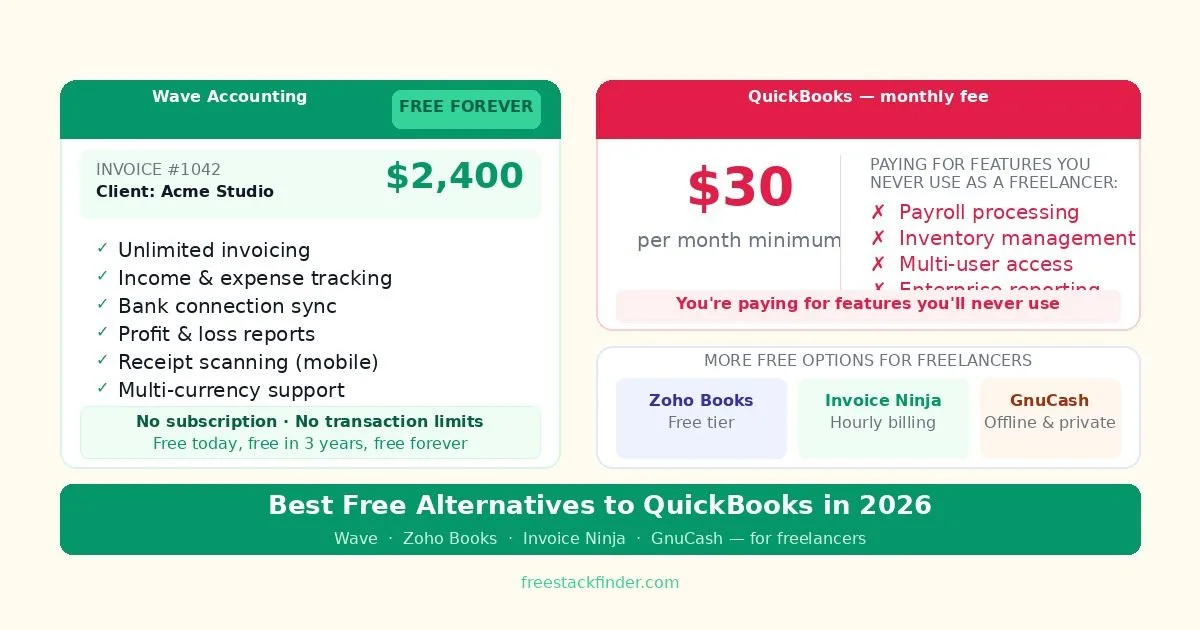
QuickBooks handles payroll, inventory, tax preparation, and multi-user access that free tools often omit. A freelance designer, consultant, or developer may only need to track income and expenses, send invoices, and prepare records for an accountant. In that smaller workflow, much of the subscription is paying for capacity the business does not use.
Wave keeps its core accounting workflow outside a recurring fee and charges for payment processing, payroll, and Pro features instead. That model makes it a usable free product for a solo business, though its bank-feed and support boundaries still need checking before a switch.
The trade-off is real: free accounting tools usually have less automation, fewer integrations, and narrower support than QuickBooks. A freelancer with a modest client list may accept more manual bookkeeping; a business reconciling daily transactions may not.
How to choose a QuickBooks replacement
Start with invoices. If your accounting workflow begins with sending professional invoices and checking whether clients paid, Wave and Zoho Books are the natural shortlist. Wave is the simpler default when you want bookkeeping and invoicing in one free account. Zoho Books is the cleaner fit when the client portal, reminders, and connection to other Zoho tools matter.
Then check the bookkeeping layer. A true QuickBooks replacement should help you track income, record expenses, reconcile accounts, and produce reports an accountant can work with. If bank feeds and reconciliation are central to your routine, Wave or Zoho Books will feel closer to QuickBooks than Invoice Ninja. If your work is mostly hourly billing, Invoice Ninja may save more time even if its financial reporting is lighter.
Assess the business complexity before switching. Payroll, inventory, multiple finance users, and accountant access are where QuickBooks still earns its fee. A freelancer can often trade some automation for a free workflow; a growing business with employees or product inventory usually cannot. The free tools below work best for a solo service business that needs reports more than audit trails or multi-user approvals.
Five replacements for different bookkeeping jobs
1. Wave: bookkeeping and invoices for a solo business
Wave is a cloud-based accounting and invoicing platform aimed at freelancers and very small businesses.
Compared with QuickBooks, Wave makes more sense when you need a basic freelance accounting workflow without payroll, inventory, or multi-user finance controls. The Starter plan covers unlimited estimates, invoices, bills, and bookkeeping records. Transactions can be entered manually, and online payments carry processing fees.
The limits sit around automation and support. Automatic bank imports, transaction categorization, late-payment reminders, and receipt capture require Wave Pro or a paid receipt add-on. Payroll, bookkeeping help, and accountant support are also paid services.
Wave fits freelancers, consultants, and sole traders who invoice clients regularly and need clean financial records for tax purposes without paying monthly for software. Its business model is built around optional payment processing and paid upgrades rather than forcing every user into a subscription on day one. For managing the client pipeline before those invoices exist, see our free CRM software guide.
2. Zoho Books free tier: best for freelancers already using Zoho tools
Zoho Books is Zoho’s cloud accounting platform with a free tier available for businesses below a certain annual revenue threshold.
Compared with QuickBooks, Zoho Books makes more sense if your small business already uses Zoho tools and wants accounting to connect naturally with CRM, Projects, and related products. The free tier includes up to 1,000 invoices per year, bank reconciliation and transaction import, basic expense tracking, a client portal for invoice viewing and payment, Zoho integrations, and automated payment reminders.
The free tier is limited to businesses under a regional revenue threshold, so check the edition available in your country. In the US, the current plan includes one user plus one accountant and up to 1,000 invoices a year. Automated workflows, custom reports, and some non-Zoho integrations require paid plans.
Zoho Books fits freelancers and small businesses already using Zoho CRM or other Zoho products, plus users who want a more structured invoicing workflow than Wave provides. The client portal and automated reminders are more refined than Wave’s, and the CRM-to-books connection is useful when client relationships and billing need to stay close together.
3. Invoice Ninja: project billing for a small client list
Invoice Ninja is an open-source invoicing and billing platform with a generous free tier and a self-hosting option for complete data control.
Unlike QuickBooks, Invoice Ninja is useful when the accounting need starts with project billing rather than a full bookkeeping suite. The free hosted plan supports up to five clients and unlimited invoices. It also includes recurring invoices, projects, billable-time tracking, vendors, and expenses. A self-hosted edition is available separately for technical users.
The hosted plan stops at five clients, and Invoice Ninja branding remains on free invoices. Bank sync, reconciliation, and financial reports are narrower than in Wave or Zoho Books.
Invoice Ninja fits freelancers who bill by the hour or track time against projects, along with technical users who want to self-host for unlimited clients. The ability to log time and convert it directly into an invoice removes a manual step that QuickBooks alternatives often leave to a separate time tracker.
4. GnuCash: best free desktop accounting for offline users
GnuCash is a free, open-source desktop accounting application that runs locally on your computer with no internet connection or cloud dependency required.
Unlike QuickBooks Online, GnuCash is better when local control matters more than cloud convenience. It includes full double-entry bookkeeping, income and expense tracking, invoicing and billing, tax reporting features, multi-currency support, Windows/macOS/Linux availability, and a completely free open-source model with no subscription or cloud account.
The trade-off is extra work. There is no cloud sync or mobile access, the interface is dated compared with modern cloud tools, automatic bank connections are absent, and transactions usually need to be imported manually via CSV. Users unfamiliar with double-entry accounting also face a steeper learning curve.
GnuCash fits freelancers who want local double-entry accounting and do not want financial data stored on a third-party server. It runs on Linux, Windows, and macOS, but its interface follows desktop accounting conventions rather than a guided cloud setup.
5. FreshBooks free trial: evaluation only
FreshBooks free trial is a cloud accounting platform popular with freelancers and service-based businesses, with a 30-day free trial.
Compared with QuickBooks, FreshBooks is not a permanent free alternative; it is a trial path into a paid accounting product. The 30-day trial gives access to paid features, but everything after the trial requires a subscription.
FreshBooks fits freelancers who want to evaluate a dedicated accounting tool before paying. The trial is useful for evaluation, but it is not a long-term free solution.
If you have outgrown Wave and want a more guided freelancer-accounting workflow, FreshBooks is a paid option. Wave remains the no-subscription pick.
Compare books, invoices, and bank feeds
| Tool | Ongoing free plan | Invoicing | Bank sync | Best for |
|---|---|---|---|---|
| Wave | ✅ Yes | ✅ Unlimited | ❌ Paid automation | Solo bookkeeping |
| Zoho Books | ✅ Yes (with limits) | ✅ 1,000/year | ✅ Yes | Zoho tool users |
| Invoice Ninja | ✅ Yes (5 clients) | ✅ Unlimited | ❌ No | Hourly billing, project work |
| GnuCash | ✅ Yes | ✅ Yes | ⚠️ Manual import | Offline, privacy-first users |
| FreshBooks | ❌ Trial only | ✅ Yes | ✅ Yes | Evaluation before paying |
| QuickBooks | ❌ Paid only | ✅ Yes | ✅ Yes | Employees, inventory, payroll |
When QuickBooks still earns its fee
QuickBooks makes the most sense for small businesses that have crossed from solo freelancing into running a company with employees, inventory, or multiple users who need the same financial records. Payroll can justify the subscription on its own because manual tax compliance creates real liability, even with one employee.
Businesses in industries where inventory tracking is central, retail, manufacturing, product-based e-commerce, also need QuickBooks or a comparable paid tool. Wave and Zoho Books free are built around service businesses that sell time and expertise, not physical goods. Trying to track inventory in Wave will create workarounds that cost more in time than the subscription saves in money.
Tax season complexity is another factor. For freelancers working across multiple countries, with complex expense structures, or who need to track VAT or GST across different jurisdictions, the automation and compliance features in QuickBooks’ paid tier save enough accountant time to justify the cost. A good accountant can tell you quickly whether your business complexity warrants the investment.
Choose around the accountant handoff
Use Wave for long-term solo bookkeeping, Zoho Books for a Zoho-based workflow, and Invoice Ninja when project billing matters more than a full accounting suite. QuickBooks earns its place once payroll, inventory, or multi-user access becomes part of daily operations.
If invoicing is your primary need rather than a full accounting layer, see our dedicated free invoicing software comparison for tools built specifically around the billing workflow. For a broader comparison beyond the QuickBooks-replacement angle, including open-source and offline-first options, see our free accounting software guide. For hourly billing, pair your accounting tool with our free time tracking software guide. For tracking budgets and expenses in a spreadsheet alongside your accounting tool, see our free spreadsheet alternatives guide.